<?xml version="1.0" encoding="UTF-8"?>
<!--Generated by Squarespace V5 Site Server v5.13.156 (http://www.squarespace.com) on Sun, 19 May 2013 21:59:20 GMT--><feed xmlns="http://www.w3.org/2005/Atom" xmlns:dc="http://purl.org/dc/elements/1.1/"><title>LawOnMyPhone</title><subtitle>LawOnMyPhone</subtitle><id>http://www.lawonmyphone.com/blog/</id><link rel="alternate" type="application/xhtml+xml" href="http://www.lawonmyphone.com/blog/"/><link rel="self" type="application/atom+xml" href="http://www.lawonmyphone.com/blog/atom.xml"/><updated>2012-11-12T03:57:12Z</updated><generator uri="http://five.squarespace.com/" version="Squarespace V5 Site Server v5.13.156 (http://www.squarespace.com)">Squarespace</generator><entry><title>A Major Update To TallyPad Is About To Be Released</title><id>http://www.lawonmyphone.com/blog/2012/11/11/a-major-update-to-tallypad-is-about-to-be-released.html</id><link rel="alternate" type="text/html" href="http://www.lawonmyphone.com/blog/2012/11/11/a-major-update-to-tallypad-is-about-to-be-released.html"/><author><name>Dan Friedlander</name></author><published>2012-11-12T01:33:54Z</published><updated>2012-11-12T01:33:54Z</updated><content type="html" xml:lang="en-US"><![CDATA[<p>I am excited to announce that a major update to the TallyPad app for the iPhone and iPad has been submitted to Apple for approval and should be available for download within the next 10 days.</p>
<p>Every day, thousands of people in over 70 countries use TallyPad to count things. I receive many emails from users describing the creative ways they are using TallyPad in their jobs and daily routines. TallyPad is used by school teachers, scientists, bus drivers, engineers, governments, children, gamers, and many others. I also receive emails suggesting features that would make TallyPad even more useful&nbsp;to them. By far, the most requested feature is the addition of more tally areas.</p>
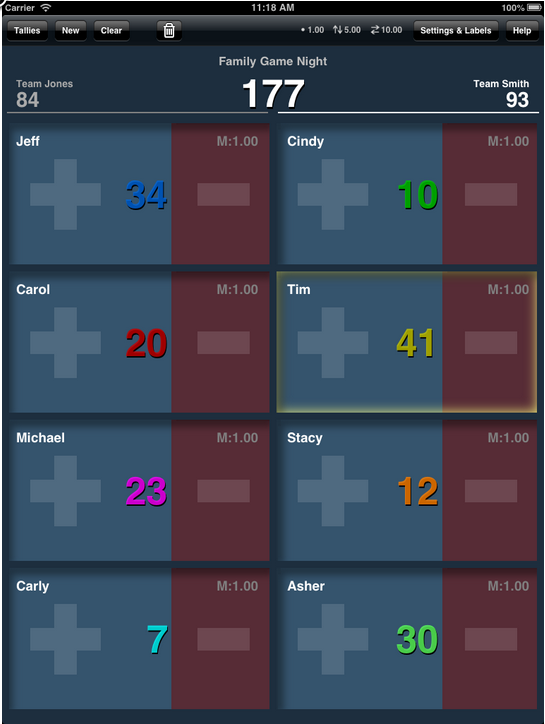
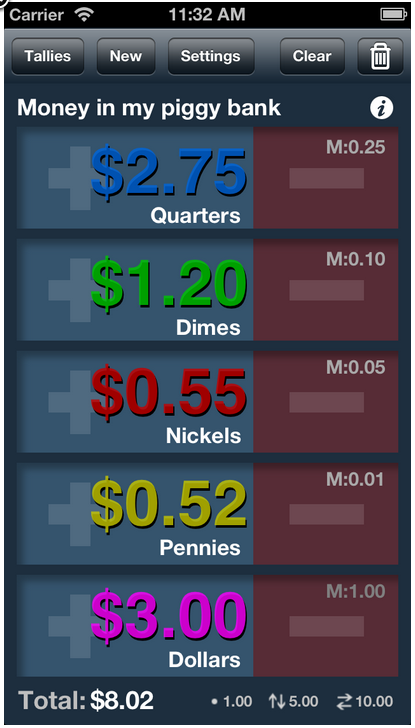
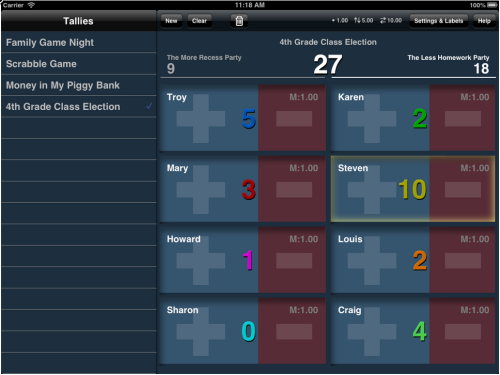
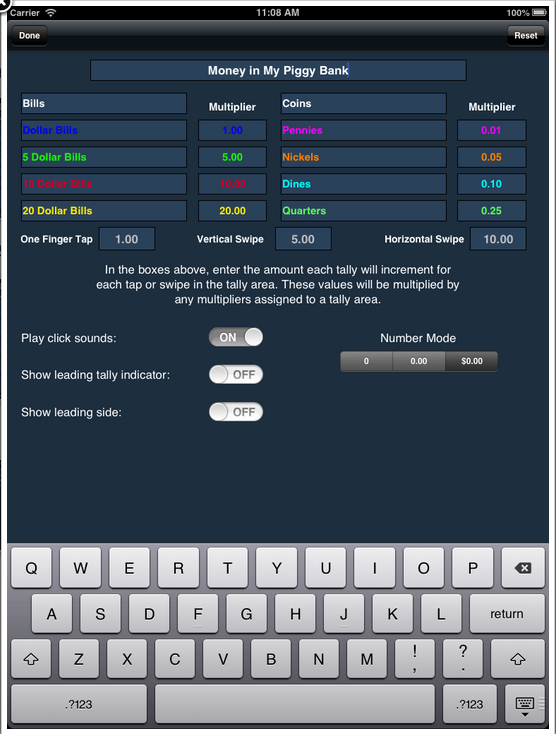
<p>Well, in response to popular demand, I have completely rewritten and redesigned TallyPad to include more tally areas: four more on the iPad, and one additional tally area on the iPhone 5. I have also redesigned the external screen scoreboard to accomodate the additional tally areas. This redesign also opened up opportunities to add many new features to the app, including leading score indicators, and team scoring on the iPad.</p>
<p>I hope my users enjoy the new features and please email me with you suggestions and comments. You can check out some screenshots below.</p>
<p><span class="full-image-block ssNonEditable"><span><img src="http://www.lawonmyphone.com/storage/ss3.png?__SQUARESPACE_CACHEVERSION=1352685801431" alt="" /></span></span></p>
<p>&nbsp;<span class="full-image-block ssNonEditable"><span><img src="http://www.lawonmyphone.com/storage/ss4.png?__SQUARESPACE_CACHEVERSION=1352685833368" alt="" /></span></span>&nbsp;</p>
<p><span class="full-image-block ssNonEditable"><span><img src="http://www.lawonmyphone.com/storage/ss2.png?__SQUARESPACE_CACHEVERSION=1352685994117" alt="" /></span></span></p>
<p><span class="full-image-block ssNonEditable"><span><img src="http://www.lawonmyphone.com/storage/ss1.png?__SQUARESPACE_CACHEVERSION=1352685886111" alt="" /></span></span></p>
]]></content></entry><entry><title>Apple's iPad vs. Microsoft's Surface: Screenshot Comparison Says It All</title><id>http://www.lawonmyphone.com/blog/2012/6/18/apples-ipad-vs-microsofts-surface-screenshot-comparison-says.html</id><link rel="alternate" type="text/html" href="http://www.lawonmyphone.com/blog/2012/6/18/apples-ipad-vs-microsofts-surface-screenshot-comparison-says.html"/><author><name>Dan Friedlander</name></author><published>2012-06-19T02:54:45Z</published><updated>2012-06-19T02:54:45Z</updated><content type="html" xml:lang="en-US"><![CDATA[<p><span class="thumbnail-image-block ssNonEditable"><span><a href="javascript:showFullImage('/display/ShowImage?imageUrl=%2Fstorage%2FiPad%20v%20Surface.png%3F__SQUARESPACE_CACHEVERSION%3D1340074543199',729,956);"><img src="http://www.lawonmyphone.com/storage/thumbnails/5984935-18830432-thumbnail.jpg?__SQUARESPACE_CACHEVERSION=1340074543200" alt="" /></a></span></span></p>
<p>I just couldn&#8217;t resist&#8230;</p>
]]></content></entry><entry><title>Klein Friedlander LLP Open Its Doors</title><id>http://www.lawonmyphone.com/blog/2012/2/20/klein-friedlander-llp-open-its-doors.html</id><link rel="alternate" type="text/html" href="http://www.lawonmyphone.com/blog/2012/2/20/klein-friedlander-llp-open-its-doors.html"/><author><name>Dan Friedlander</name></author><published>2012-02-21T00:55:33Z</published><updated>2012-02-21T00:55:33Z</updated><content type="html" xml:lang="en-US"><![CDATA[<p><h3><span class="full-image-block ssNonEditable"><span><img src="http://www.lawonmyphone.com/storage/Klein%20Friedlander%20Trial%20Lawyers%20Logo%20white.png?__SQUARESPACE_CACHEVERSION=1329786115371" alt="" /></span></span></h3><br /><h3><em>New Firm of Trial Lawyers To Focus on Business Disputes, Employment Defense, and Real Estate-related Litigation Matters</em></h3><br /><strong><br />Westlake Village, CA</strong> &ndash; Tuesday, February 21, 2012 - Klein Friedlander LLP today announced the opening of a new firm, located in Westlake Village, CA.  Focusing primarily on representing clients in business, labor and employment, and real estate-related litigation matters, Klein Friedlander provides experienced, successful trial lawyers who efficiently and cost-effectively represent clients in their most complex matters.  Founders Louis Klein and Dan Friedlander, formerly with Jackson DeMarco Tidus and Peckenpaugh P.C., have joined forces to create a distinctive law firm that combines all the advantages of smaller firms (lower rates, less overhead, agility) with those of larger firms (successful litigators with significant trial experience, deep industry and practice knowledge, familiarity with numerous courts, judges arbitrators and mediators).</p><p>&ldquo;We&rsquo;re excited about our new venture and our clients are as well,&rdquo; said Louis Klein.  &ldquo;Between the two of us, we have many years of experience representing a broad range of public and private clients in complex litigation.  Both Dan and I have &lsquo;big law&rsquo; experience and we bring that to bear in representing our clients.  We&rsquo;ve also worked in mid-size and smaller firms and understand the need for efficient, cost-effective and adaptable legal services for regional and local companies.  Given our experience and successes, we can handle litigation matters of almost any size in a way that brings greater value to our clients without sacrificing superior advocacy.&rdquo;</p><p>Dan Friedlander added, &ldquo;Our goal is to provide clients with focused, &lsquo;top-of-the-line&rsquo; legal representation.  Our clients can be assured that when they hire Klein Friedlander, they will get the full attention of a partner who will work with them until their matter is resolved.  We also know that clients are under significant pressure to contain their outside legal costs, so we&rsquo;re dedicated to coming up with fee structures and arrangements that work best for our clients.  Our rates are reasonable and our business model allows us to be nimble and responsive.&rdquo;</p><p><strong>Louis C. Klein</strong><strong> </strong></p><p>Louis Klein has practiced business and employment law since 1997, successfully representing public entity and private clients in complex litigation encompassing contract disputes, unfair competition, misappropriation of trade secrets, copyright infringement, whistleblowing retaliation, sexual harassment and discrimination.  He is experienced in all aspects of business and employment litigation, workplace investigation, case management, settlement and mediation practice, and trial practice.  In addition, he is often asked to speak and write about employment topics for statewide publications, professional conferences and national magazines.</p><p>Louis received his B.A. from Norwich University and his J.D. from Whittier Law School.  In addition to various bar memberships, Lou is a member of the Society for Human Resource Management and the Association of Workplace Investigators (AWI).</p><p><strong>Dan Friedlander</strong></p><p>Dan Friedlander has substantial experience representing clients in complex litigation involving real estate transactions, property development, land use, and environmental matters.  He has represented clients in litigation before both state and federal courts and in appeals before the California Court of Appeals.  In addition, Dan represents commercial landlords and tenants in complex unlawful detainer litigation and lease disputes.</p><p>Dan received his B.S. in City and Regional Planning from California Polytechnic State University and his J.D. from Jefferson Thomas School of Law.  He is also a certified member of the American Planning Association&rsquo;s (APA) American Institute of Certified Planners (AICP) where he currently serves as the Chairman of the APA&rsquo;s Planning and Law Division.  In addition, Dan is the Chairman of the Board of Trustees of The Oracle Mutual Fund.  He is also the owner and founder of LawOnMyPhone.com, a technology company that develops legal software for mobile devices, such as the iPhone and iPad.</p><p><strong>About Klein Friedlander LLP</strong></p><p>Klein Friedlander LLP provides exceptional, focused legal representation to clients in business, employment and real estate-litigation matters.  Founded by experienced and successful trial lawyers, our distinctive business model offers all the advantages of smaller firms (lower rates, less overhead, agility), as well as those found in larger firms (sophisticated practice; deep industry and practice knowledge; familiarity with numerous courts, judges, arbitrators and mediators).  </p>]]></content></entry><entry><title>Do Date: New iPhone date calculator app uses the lock screen and notification center for daily reminders.</title><id>http://www.lawonmyphone.com/blog/2011/12/19/do-date-new-iphone-date-calculator-app-uses-the-lock-screen.html</id><link rel="alternate" type="text/html" href="http://www.lawonmyphone.com/blog/2011/12/19/do-date-new-iphone-date-calculator-app-uses-the-lock-screen.html"/><author><name>Dan Friedlander</name></author><published>2011-12-19T19:05:09Z</published><updated>2011-12-19T19:05:09Z</updated><content type="html" xml:lang="en-US"><![CDATA[<div id="_mcePaste"><span class="full-image-float-right ssNonEditable"><span><img src="http://www.lawonmyphone.com/storage/Icon2x.png?__SQUARESPACE_CACHEVERSION=1324321748049" alt="" /></span></span></div>
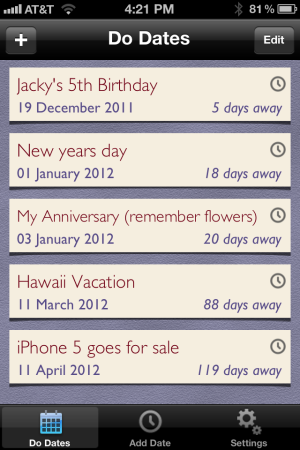
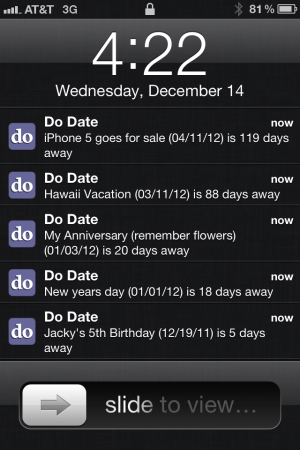
<div id="_mcePaste">Do Date is a general date calculator and and daily reminder app that uses the iPhone notification center and lock screen to provide daily notifications of important upcoming events.</div>
<p>&nbsp;</p>
<div id="_mcePaste">Once you enter events and dates in the app, you will receive reminders every day in your lock screen telling you the event name and how many days are left before the date arrives. For example, your daily reminder may say &ldquo;Jack&rsquo;s 5th birthday is 8 days away.&rdquo;</div>
<p>&nbsp;</p>
<div></div>
<div>Do Date is available on the <a href="http://goo.gl/IIPT2">App Store</a> for $0.99.</div>
<div></div>
<p>&nbsp;</p>
<p><span class="full-image-block ssNonEditable"><span><img src="http://www.lawonmyphone.com/storage/IMG_0255.PNG?__SQUARESPACE_CACHEVERSION=1324321803413" alt="" /></span></span>&nbsp;<span class="full-image-block ssNonEditable"><span><img src="http://www.lawonmyphone.com/storage/IMG_0257.PNG?__SQUARESPACE_CACHEVERSION=1324321840831" alt="" /></span></span></p>
]]></content></entry><entry><title>TallyPad has been updated for iOS 5: Now a Universal App that supports AirPlay Mirroring to AppleTV in full HD.</title><id>http://www.lawonmyphone.com/blog/2011/10/7/tallypad-has-been-updated-for-ios-5-now-a-universal-app-that.html</id><link rel="alternate" type="text/html" href="http://www.lawonmyphone.com/blog/2011/10/7/tallypad-has-been-updated-for-ios-5-now-a-universal-app-that.html"/><author><name>Dan Friedlander</name></author><published>2011-10-08T04:20:24Z</published><updated>2011-10-08T04:20:24Z</updated><content type="html" xml:lang="en-US"><![CDATA[<div id="_mcePaste"></div>
<div id="_mcePaste">
<p class="MsoNormal"><strong>Now a Universal App for the iPad and iPhone!</strong><br /><span class="full-image-float-right ssNonEditable"><span><img style="width: 125px;" src="http://www.lawonmyphone.com/storage/colorIconLarge.png?__SQUARESPACE_CACHEVERSION=1272318431799" alt="" /></span></span></p>
<p class="MsoNormal"><strong>TallyPad</strong> is a feature-rich fully-customizable tally counter for the iPad and iPhone. Just tap or swipe your finger in one of the four designated boxes to add or subtract from the corresponding tally count.&nbsp;</p>
<p class="MsoNormal"><a href="http://goo.gl/gurzt">AppAdvice.com</a> describes TallyPad as the &#8220;essential [counting app] for those dealing with multiple tallies and have power user needs.&#8221;</p>
<p class="MsoNormal">TallyPad is great for just about any counting project:</p>
</div>
<p><span style="color: #010101; font-family: Georgia, 'Times New Roman', serif; font-size: 16px; line-height: 24px;"> </span></p>
<ul style="list-style-type: square; margin-top: 1em; margin-right: 0px; margin-bottom: 1em; margin-left: 0px; padding-top: 0px; padding-right: 0px; padding-bottom: 0px; padding-left: 2em;">
<li>Scorekeeping (especially board games like Scrabble)</li>
<li>Surveys</li>
<li>Tracking calories or diet points</li>
<li>Counting money and loose change</li>
<li>School projects</li>
<li>Household Projects</li>
<li>Voting and Informal elections</li>
</ul>
<p><strong>New in version 3.1 (with iOS 5), AirPlay Mirroring on the iPad with AppleTV and AV Out to an externmal monitor. </strong>You can now view your tallies on a TV or external monitor in full HD.</p>
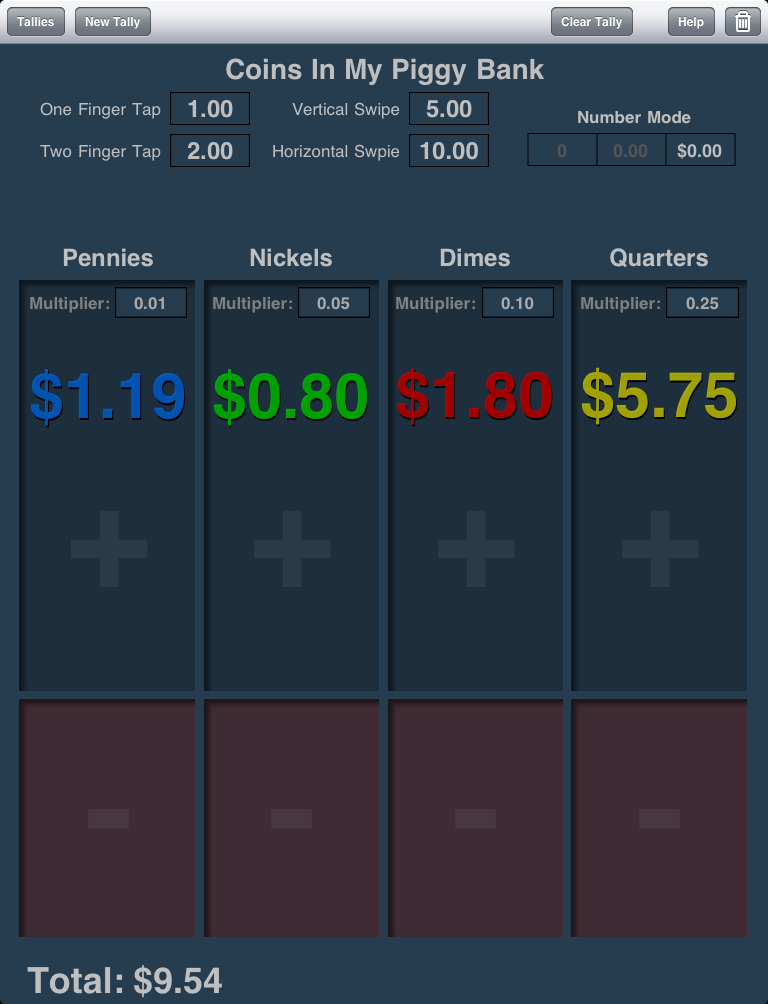
<p>Many people use TallyPad to keep score while playing board games, like Scrabble. &nbsp;Because most board games have four players, version 2.0 now has a fourth counting area. &nbsp;Also new in version 2.0, you can now assign a multiplier to each counting area. The multipliers are applied to each counting area independent of the values assigned to finger gestures. This is especially great for counting coins. For example, you can assign a value to each counting area (.01, .05, .10, and .25) representing pennies, nickels, dimes, and quarters. &nbsp;You can then assign independent values to the tapping and swiping gestures. TallyPad counts all your change and gives you a grand total at the bottom.</p>
<p>&nbsp;</p>
<div id="_mcePaste">
<ul>
</ul>
<p class="MsoNormal"><strong><span class="full-image-float-left ssNonEditable"><span><img style="width: 200px;" src="http://www.lawonmyphone.com/storage/MoneyP.PNG?__SQUARESPACE_CACHEVERSION=1286901543038" alt="" /></span></span>&nbsp;What makes TallyPad different</strong> from all other counting applications is that you can assign customizable values to four different finger gestures. For example, you can set TallyPad to add 1 to the tally count for a single finger tap, 2 for a two finger tap, 5 for a vertical swipe and 10 for a horizontal swipe. You get to chose the values. Also, you are not limited to whole numbers: Just switch TallyPad to decimal or money mode to add decimal values.</p>
<p class="MsoNormal">&nbsp;</p>
<p class="MsoNormal">Because TallyPad saves all your custom-named tallies, you can keep track of a virtually unlimited number of tallies and come back to them later. You can also assign names to the three tally categories in each tally project. Also, the TallyPad user interface was designed to allow you to add tallies by tapping and swiping without having to look down at the iPad. This way you can keep your eyes on what you are counting&#8212;not on the iPad.</p>
<p class="MsoNormal">TallyPad is now available on the <a href="http://itunes.apple.com/us/app/tallypad/id369757111?mt=8">App Store</a>.</p>
<!--EndFragment--></div>
<p><span class="full-image-float-left ssNonEditable"><span><img style="width: 200px;" src="http://www.lawonmyphone.com/storage/TallyPadQR.gif?__SQUARESPACE_CACHEVERSION=1283290610180" alt="" /></span></span>&nbsp;</p>
]]></content></entry><entry><title>Court Days Pro rules-based calendaring app and date calculator now available from the iTunes Store</title><id>http://www.lawonmyphone.com/blog/2011/2/22/court-days-pro-rules-based-calendaring-app-and-date-calculat.html</id><link rel="alternate" type="text/html" href="http://www.lawonmyphone.com/blog/2011/2/22/court-days-pro-rules-based-calendaring-app-and-date-calculat.html"/><author><name>Dan Friedlander</name></author><published>2011-02-22T22:12:01Z</published><updated>2011-02-22T22:12:01Z</updated><content type="html" xml:lang="en-US"><![CDATA[<p><span class="full-image-float-left ssNonEditable"><span><img src="http://www.lawonmyphone.com/storage/Icon100px.png?__SQUARESPACE_CACHEVERSION=1297471960137" alt="" /></span></span><strong>﻿﻿<a href="http://goo.gl/EMcvy">Court Days Pro</a></strong> is the first rules-based legal calendaring app for the iPhone and iPad. Court Days Pro provides attorneys and legal professionals with the ability to calculate dates and deadlines based on a customizable database of court rules and statutes. Once the rules are set up in the application, calculations are performed using a customizable list of court holidays.<br /><br />Once you chose a triggering event (e.g., a motion hearing date) the application will display a list of all events and corresponding dates and deadlines based of trigging event (e.g., last day to file moving papers, opposition, reply briefs). Icons on the screen show the number of calendar days and court days from the current date for all resulting events.&nbsp;<br /><br />By default, Court Days Pro is preprogrammed with a list of all federal holidays, but is fully customizable to allow the addition or removal of any court holiday to the list (e.g., Lincoln&#8217;s Birthday in California State Court).&nbsp;<br /><br />Adding, deleting, and modifying rules-based events in Court Days Pro is quick and easy, and was specifically programmed to allow multi-step calculations. For example, if you are calculating the deadline for filing a regular motion in California Superior Court, you can set the application to calculate back 16 court days, plus 5 calendar days, with the last day falling backward to the next available court day, should it land on a weekend or holiday. You can set an unlimited number of calculations to be triggered by a single event.&nbsp;<br /><br />Date results not only appear on the screen, but can be added to the device&#8217;s native calendar app, and later revised or deleted from within Court Days Pro. Also, all results can be emailed straight from the application.&nbsp;<br /><br />Future versions of Court Days Pro will allow the purchase of preprogrammed rules sets for certain jurisdictions by using in-app purchasing.</p>
<p>You can read Jeff Richardson&#8217;s Review of Court Days Pro at <a href="http://www.iphonejd.com/iphone_jd/2011/02/review-court-days-pro.html">iPhoneJD.com</a>.</p>
<p>&nbsp;</p>
<p><span class="full-image-block ssNonEditable"><span><a href="http://goo.gl/EMcvy"><img src="http://www.lawonmyphone.com/storage/chart.png?__SQUARESPACE_CACHEVERSION=1298407274002" alt="" /></a></span><span class="thumbnail-caption" style="width: 100px;">iTunes Store Link</span></span></p>
<p>Here are just a few screenshots from the app.</p>
<p><span class="thumbnail-image-block ssNonEditable"><span><a href="javascript:showFullImage('/display/ShowImage?imageUrl=%2Fstorage%2Fcourtdayspro-screenchots%2FIMG_0176.PNG%3F__SQUARESPACE_CACHEVERSION%3D1297474282560',1024,768);"><img src="http://www.lawonmyphone.com/storage/thumbnails/5984935-10704615-thumbnail.jpg?__SQUARESPACE_CACHEVERSION=1297474282561" alt="" /></a></span></span></p>
<p>&nbsp;</p>
<p><span class="thumbnail-image-block ssNonEditable"><span><a href="javascript:showFullImage('/display/ShowImage?imageUrl=%2Fstorage%2Fcourtdayspro-screenchots%2FIMG_0172.PNG%3F__SQUARESPACE_CACHEVERSION%3D1297474301761',1024,768);"><img src="http://www.lawonmyphone.com/storage/thumbnails/5984935-10704611-thumbnail.jpg?__SQUARESPACE_CACHEVERSION=1297474301763" alt="" /></a></span></span></p>
<p>&nbsp;</p>
<p><span class="thumbnail-image-block ssNonEditable"><span><a href="javascript:showFullImage('/display/ShowImage?imageUrl=%2Fstorage%2Fcourtdayspro-screenchots%2FIMG_0182.PNG%3F__SQUARESPACE_CACHEVERSION%3D1297474320218',1024,768);"><img src="http://www.lawonmyphone.com/storage/thumbnails/5984935-10704604-thumbnail.jpg?__SQUARESPACE_CACHEVERSION=1297474320218" alt="" /></a></span></span></p>
<p>&nbsp;</p>
<p><span class="thumbnail-image-block ssNonEditable"><span><a href="javascript:showFullImage('/display/ShowImage?imageUrl=%2Fstorage%2Fcourtdayspro-screenchots%2FIMG_0483.PNG%3F__SQUARESPACE_CACHEVERSION%3D1297474341984',960,640);"><img src="http://www.lawonmyphone.com/storage/thumbnails/5984935-10704584-thumbnail.jpg?__SQUARESPACE_CACHEVERSION=1297474341985" alt="" /></a></span></span></p>
<p>&nbsp;</p>
<p><span class="thumbnail-image-block ssNonEditable"><span><a href="javascript:showFullImage('/display/ShowImage?imageUrl=%2Fstorage%2Fcourtdayspro-screenchots%2FIMG_0492.PNG%3F__SQUARESPACE_CACHEVERSION%3D1297474355480',960,640);"><img src="http://www.lawonmyphone.com/storage/thumbnails/5984935-10704582-thumbnail.jpg?__SQUARESPACE_CACHEVERSION=1297474355481" alt="" /></a></span></span></p>
]]></content></entry><entry><title>Coming Soon: Court Days Pro for the iPhone and iPad</title><id>http://www.lawonmyphone.com/blog/2011/2/11/coming-soon-court-days-pro-for-the-iphone-and-ipad.html</id><link rel="alternate" type="text/html" href="http://www.lawonmyphone.com/blog/2011/2/11/coming-soon-court-days-pro-for-the-iphone-and-ipad.html"/><author><name>Dan Friedlander</name></author><published>2011-02-12T01:20:54Z</published><updated>2011-02-12T01:20:54Z</updated><content type="html" xml:lang="en-US"><![CDATA[<p><span class="full-image-float-left ssNonEditable"><span><img src="http://www.lawonmyphone.com/storage/Icon100px.png?__SQUARESPACE_CACHEVERSION=1297473895364" alt="" /></span></span>LawOnMyPhone has submitted its latest iPhone and iPad app for lawyers to Apple for approval. It is the first rules-based legal calendaring app and date calculator for mobile devices.</p>
<p>Check out <a href="http://www.lawonmyphone.com/court-days-pro/">this page</a> for a sneak peak at the app, scheduled for release in a couple of weeks.</p>
]]></content></entry><entry><title>Beta Testers Needed</title><id>http://www.lawonmyphone.com/blog/2011/1/26/beta-testers-needed.html</id><link rel="alternate" type="text/html" href="http://www.lawonmyphone.com/blog/2011/1/26/beta-testers-needed.html"/><author><name>Dan Friedlander</name></author><published>2011-01-27T00:40:28Z</published><updated>2011-01-27T00:40:28Z</updated><content type="html" xml:lang="en-US"><![CDATA[<p><strong>Want to beta test for LawOnMyPhone?&nbsp;</strong></p>
<p>LawOnMyPhone is looking for litigation attorneys to beta test a new iPhone/iPad app for lawyers. Previous beta testing experience or familiarity with the iOS SDK is a plus, but is not necessary; familiarity with litigation practice is preferred.</p>
<p>If you are interested, please register <a href="http://goo.gl/7SJuG">here</a>.</p>
]]></content></entry><entry><title>A Universal Note-Taking Workflow for Lawyers: Keep your iPhone, iPad, and desktop notes in sync and backed-up</title><id>http://www.lawonmyphone.com/blog/2010/12/8/a-universal-note-taking-workflow-for-lawyers-keep-your-iphon.html</id><link rel="alternate" type="text/html" href="http://www.lawonmyphone.com/blog/2010/12/8/a-universal-note-taking-workflow-for-lawyers-keep-your-iphon.html"/><author><name>Dan Friedlander</name></author><published>2010-12-08T19:13:46Z</published><updated>2010-12-08T19:13:46Z</updated><content type="html" xml:lang="en-US"><![CDATA[<p>Lawyers have an abundance of tools available to them for taking notes. On the desktop, the options range from simple (TextEdit on the Mac) to robust (MS Word or Pages). On the iPad and iPhone, there are a number of useful note-taking applications (e.g. Elements, iWriter, PlainText.) There are also several web apps that will work from any browser, such as SimpleNote and Google Docs.</p>
<p>Each of these note-taking tools&mdash;and I&#8217;ve tried them all&mdash;has its strengths and weaknesses and, conceivably, I could make a good case for using any one of them. The problem is that no single method for taking notes will work in every location. For example, if I am at my desk, I shouldn&#8217;t have to take out my iPad to jot down some notes. Likewise, I shouldn&#8217;t have to carry around my MacBook everywhere I go. The challenge for me, therefore, was finding a universal note-taking workflow that allows me to take notes wherever I may be, and to have the most current version of those notes immediately available wherever I may go. I also needed to be assured that, should any one of my gadgets (Mac, iPhone, iPad, cloud storage) fail, all of my notes are backed up and recoverable.</p>
<p>Thus, my requirements for a universal note-taking workflow were as follows:</p>
<ul>
<li>Notes must be in a file format readable in all applications without the need for conversion;</li>
<li>Current versions of my notes must be immediately&nbsp;accessible&nbsp;from any location;</li>
<li>Notes must be backed-up in the cloud;</li>
<li>I must be able to take notes efficiently on any of my devices without much&nbsp;hassle.</li>
</ul>
<p>After much experimentation, I developed a universal note-taking workflow that satisfies my requirements. The solution involves using a basic no-frills text editor on the desktop, Elements on the iPhone and iPad, and DropBox for syncing, backup, and cloud storage. Here is how to do it.</p>
<p><strong>First, set up a DropBox account</strong></p>
<p><span class="full-image-float-right ssNonEditable"><span><img style="width: 75px;" src="http://www.lawonmyphone.com/storage/Screen shot 2010-12-08 at 3.15.05 PM.png?__SQUARESPACE_CACHEVERSION=1291850277257" alt="" /></span></span>You will need to set up a free DropBox account at <a href="http://db.tt/pMx8EjH">DropBox.com</a>. DropBox is a wonderful and secure utility that stores and backs-up your files. Once installed, DropBox will create a folder on your desktop computer. Any files placed in the DropBox folder (or any subfolders created within it) will be automatically synced and backed-up on their cloud servers. DropBox stores the current copy of your files both locally on your desktop and in the cloud. So, by default, your files will now located in at least two separate locations and you will always be able to access your files from the DropBox website. Even better, if you set up a DropBox folder on multiple computers and link them all to one DropBox account, the files on each computer and the cloud are updated the moment you make a change to any of those files from any location. Once your DropBox account is set up, create a subfolder in your DropBox folder called &#8220;Elements&#8221;&mdash;I&#8217;ll explain why you need this below.</p>
<p><strong>Second, use a simple text editor on your desktop</strong></p>
<p><span class="full-image-float-right ssNonEditable"><span><img style="width: 80px;" src="http://www.lawonmyphone.com/storage/Screen shot 2010-12-08 at 3.15.53 PM.png?__SQUARESPACE_CACHEVERSION=1291850379779" alt="" /></span></span>Powerful word processors, such as MS Word or Pages, certainly have their place in the law office. For taking notes, however, using a word processor is&nbsp;unnecessary&nbsp;and burdensome and, in fact, results in a number of problems when trying to access and edit notes on other devices. The solution is to use a no-frills text editor to write notes and to save those notes as plaint text (.txt) files. On my Mac, I use the basic TextEdit application that comes free with every Mac. To make the notes universally compatible across all of your devices, set the default file format to plain text (rather than rich text) in the application preferences. Plain text files do not have any formatting, such as bold and italics&mdash;but those things just tend to be distractions when taking notes anyway. Any plain text notes you create in TextEdit should be saved to the Elements folder you created above, or in a project-specific subfolder within the Elements folder.</p>
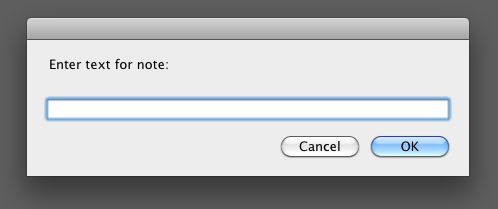
<p>If you are a bit more tech-savvy, you can create an Automator action on your Mac that simplifies and drastically speeds-up the note-taking workflow. Automator is another incredibly useful (and underutilized) application that comes free with every Mac. Using a drag-and-drop interface, it allows you to easily create automated workflows for multi-step common tasks, without requiring any programming knowledge on your part. For example, I set up an Automator action, which I activate simply by pressing a hot-key, that presents me with a dialog box where I enter the text of my note. It then asks me to enter a file name for the note and automatically saves the note to my Elements folder. It is immediately synced to the cloud through DropBox.</p>
<p><span class="full-image-block ssNonEditable"><span><img style="width: 300px;" src="http://www.lawonmyphone.com/storage/Screen shot 2010-12-08 at 3.33.29 PM.png?__SQUARESPACE_CACHEVERSION=1291851326874" alt="" /></span><span class="thumbnail-caption" style="width: 300px;">Creating a text note with an Automator action</span></span></p>
<p><strong>Third, install Elements on your iPad and iPhone</strong></p>
<p><span class="full-image-float-right ssNonEditable"><span><img style="width: 75px;" src="http://www.lawonmyphone.com/storage/Screen shot 2010-12-08 at 3.14.23 PM.png?__SQUARESPACE_CACHEVERSION=1291850428644" alt="" /></span></span>To complete the universal note-taking set-up, install the <a href="http://www.secondgearsoftware.com/elements/">Elements</a> note-taking application on your iPad and/or iPhone. It costs just a few dollars, but is well worth it. (I also sugget that you install the free <a href=" http://db.tt/pMx8EjH">DropBox</a> application on your mobile devices, which is not necessary for taking and accessing your notes, but will give you access to all of your DropBox files.) Once Elements is installed, you can link the application to your DropBox account. Then, any notes you create on the mobile device will be automatically saved in the Elements folder in your DropBox account. The application saves your progress every few seconds as you type, so you don&#8217;t have to worry if your note-taking session gets interrupted&mdash;for example, if you receive a phone call while taking notes on the iPhone. Of course, your notes are immediately synced with the DropBox folders on all of your desktop computers.</p>
<p>In additional, any notes you previously created on your desktop and saved in the Elements folder are available for reading and editing on your mobile device. The Elements application allows you to create project-specific subfolders within the Elements folder and provides lots of options for customizing the note-taking experience (e.g. typeface and font size.) Beyond its technical merits, taking notes in Elements on the iPad is fast and easy.&nbsp;</p>
<p><strong>Putting it all together</strong></p>
<p>This workflow has been serving me well. No matter where I am (in the office, at home, in court, or at a hotel), I feel comfortable that my notes are always accessible, up to date, and backed-up. I have many options for taking notes, yet the notes are all stored in the same place and in the same file format. The other great thing about maintaining your notes in a plain text format is that the notes are universally compatible with every word processing application on every operating system. Similarly, you can copy and paste plain text into an e-mail application or word processor without encountering any formatting problems. It&#8217;s a simple and efficient way to work. Save the more complicated stuff for your legal briefs.</p>
]]></content></entry><entry><title>Typography for Lawyers: A must read for every lawyer</title><id>http://www.lawonmyphone.com/blog/2010/12/2/typography-for-lawyers-a-must-read-for-every-lawyer.html</id><link rel="alternate" type="text/html" href="http://www.lawonmyphone.com/blog/2010/12/2/typography-for-lawyers-a-must-read-for-every-lawyer.html"/><author><name>Dan Friedlander</name></author><published>2010-12-02T22:34:45Z</published><updated>2010-12-02T22:34:45Z</updated><content type="html" xml:lang="en-US"><![CDATA[<p>I am a big fan of Matthew Butterick&#8217;s website <a href="http://www.typographyforlawyers.com">Typography for Lawyers</a>. Matthew, a practicing attorney and former typographer, instructs lawyers how to use typographic tools and techniques to better communicate and persuade others through writing. He eloquently points out how lawyers&mdash;steeped in tradition and incredibly reluctant to change the way they write&mdash;use poor typography in their legal briefs, memoranda, and correspondence.</p>
<p>Most people think typography is about selecting fonts. But it is about much more than font selection. Typography is concerned with all aspects of presenting written material on the page, including type composition, page layout, text formatting, etc. Matthew explores each of these categories, explaining rules and providing examples of both good and bad technique. He explains how good typography can make an enormous difference in the presentation of one&#8217;s writing and, consequently, how it can make one&#8217;s writing more persuasive.</p>
<p>Matthew also discusses how lawyers commonly misinterpret court rules concerning page and text formatting, believing that the rules inhibit the use of good typography. Whereas, in reality, most court rules provide enough flexibility for lawyers to implement good typographic technique. &nbsp;Matthew not only explains how to correctly interpret the court rules, but supplies before and after samples of pleadings and memoranda.</p>
<p>As if the website was not enough, Matthew has put this incredible resource (and much more) into a book entitled&nbsp;<em>Typography for Lawyers</em>, which is available for purchase through&nbsp;<a href="http://typo.la/jmp">Jones McClure Publishing</a>.</p>
<p>One of my favorite sections of the website and the book discusses how many spaces (one or two) should follow a period between sentences. I have advocated for one space for as long as I can remember. After all, every modern style manual calls for one space rather than two. Yet, most lawyers I know insist on using two spaces&mdash;a throw back to the typewriter era. I have had more than a few office run-ins on the subject and I assume that Matthew has too, considering that he dedicates several pages in his book to the issue, wherein he cites both the experts and the hold-outs.</p>
<p>I have read the book twice in the two weeks I&#8217;ve owned it and it has forever changed the way I look at the written page. I only wish he had published the book ten years ago when I started practicing law. The book should be mandatory reading for all attorneys, new and old.</p>
]]></content></entry></feed>